Affiliate Network Integration
ClickerVolt integrates with 70+ affiliate networks through server-to-server (S2S) conversion tracking. No scripts or code installation required - the network notifies ClickerVolt directly when sales occur. Two integration methods are available:
- IPN (Instant Payment Notification) - For ClickBank, JVZoo, WarriorPlus, and Explodely
- S2S Postback URLs - For 60+ networks including MaxBounty, Awin, Digistore24, and more
Both methods provide automatic conversion tracking with commission amounts, transaction IDs, and revenue data.
Supported Networks
IPN Networks (4):
These networks use specialized IPN (Instant Payment Notification) endpoints:
- ClickBank
- JVZoo
- WarriorPlus
- Explodely
S2S Postback Networks (65+):
These networks use standard server-to-server postback URLs. Examples include:
- MaxBounty
- Awin
- Digistore24
- Everflow
- Affise
- Market Health
- CPAGrip
- Mobidea
- And 60+ more networks...
The full list of supported networks is available in the tracking setup interface when you configure a target.
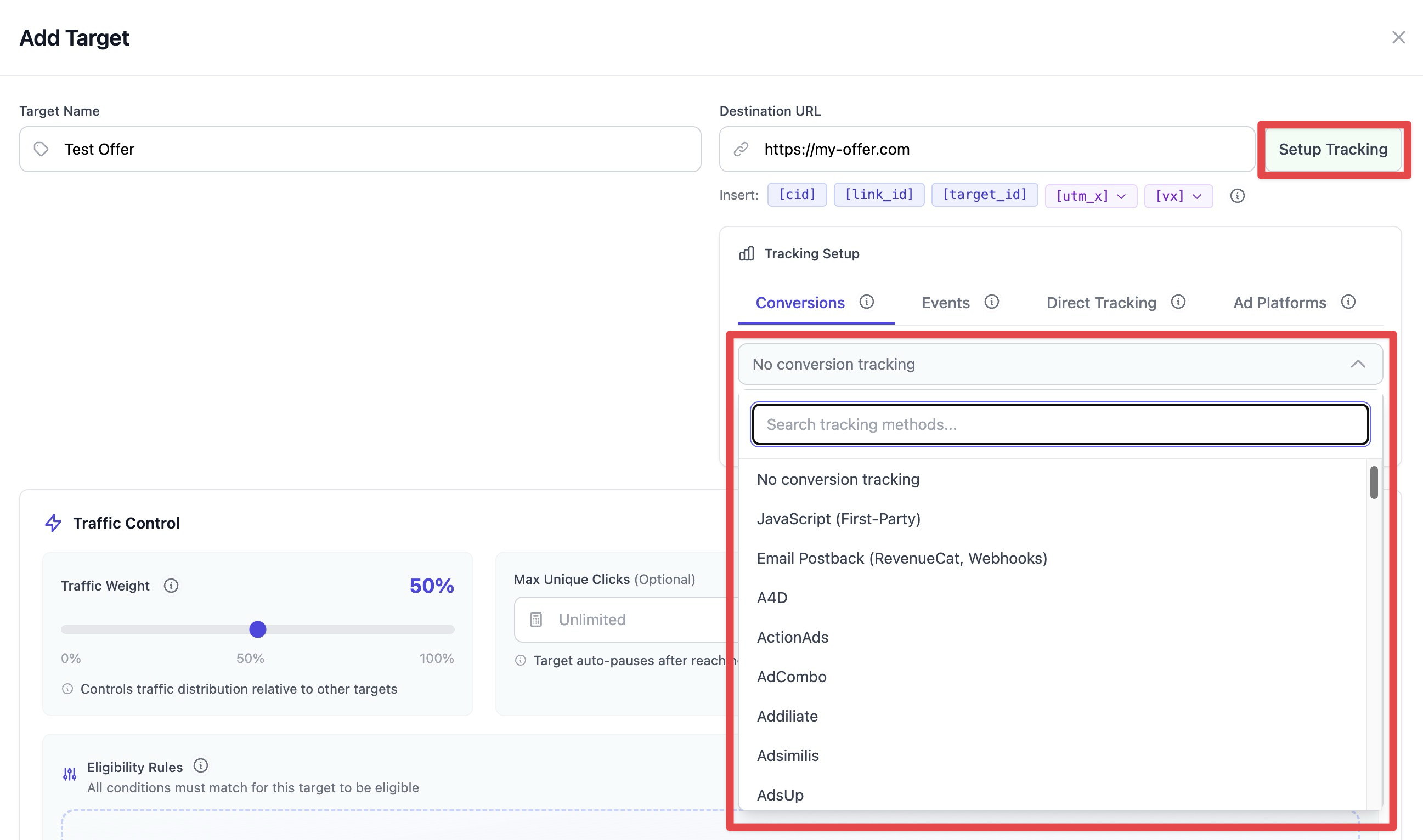
How It Works
Both IPN and S2S postback methods follow the same general flow:
- Configure conversion tracking on a target and select your affiliate network
- ClickerVolt automatically injects a tracking parameter into your target URL
- Visitor clicks your tracking link and is redirected to the affiliate offer
- Visitor makes a purchase and the network processes the sale
- The network sends a notification (IPN or postback) to ClickerVolt with your tracking parameter
- ClickerVolt matches the sale to the original click and records the conversion
- Revenue and transaction details appear in your statistics within seconds
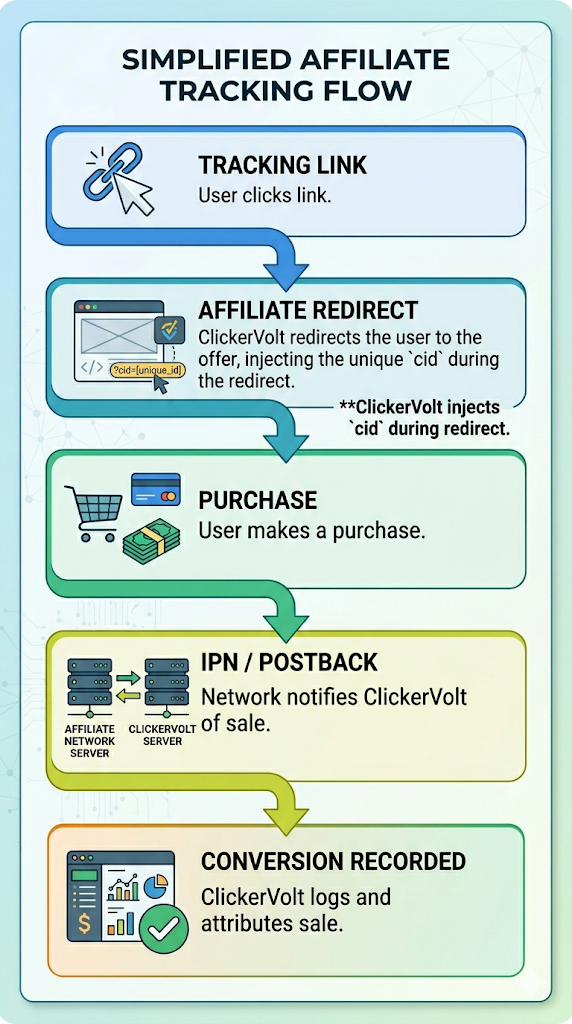
The key difference: IPN networks use specialized endpoints, while S2S postback networks use a configurable postback URL you add to the network's settings.
Setup Instructions
Step 1: Access Tracking Settings
- Open your link in the editor
- Add or edit a target
- Click the "Setup Tracking" button next to the target URL field
- Select your affiliate network from the dropdown
Step 2: Inject Tracking Parameter
ClickerVolt will check if your target URL contains the required tracking parameter for the selected network. If missing, click "INJECT INTO URL" to automatically add it. This parameter passes your click ID to the network so they can include it in their notifications.
![The tracking setup interface for JVZoo displays a missing postback parameter warning with an orange button to automatically inject the required tid=[cid] parameter into the destination URL.](https://usercom.app/images/EWqNDCZy87l3zt8ngMVUU/1778773692787-b66e5b75-CleanShot_2026-05-14_at_16.47.36_2x.jpg)
Step 3: Configure Network-Side Settings
For IPN Networks (ClickBank, WarriorPlus, Explodely):
Copy the IPN URL displayed in ClickerVolt and add it to your network account settings. Each network has a different location for IPN configuration - see network-specific instructions below.
For S2S Postback Networks (MaxBounty, Awin, etc.):
Copy the Postback URL displayed in ClickerVolt and add it to the network's postback/pixel configuration. The URL includes network-specific tokens like {aff_sub}, #S1#, or !!!commission!!! that the network will replace with actual conversion data.
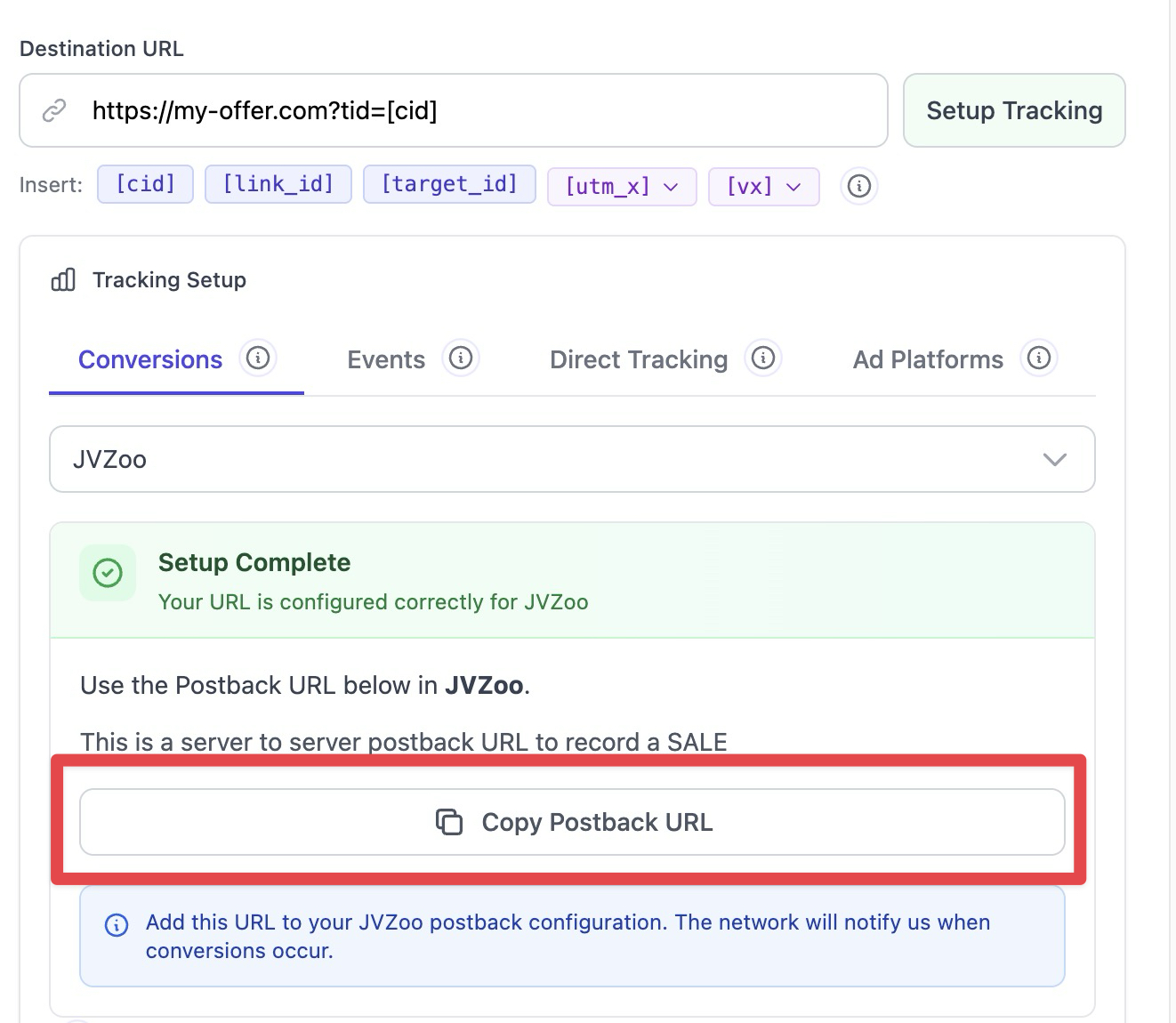
Step 4: Test the Integration
Make a test purchase (if possible) or use the network's test notification feature. Check your ClickerVolt statistics to verify the conversion appears with the correct revenue amount.
Network-Specific Notes
IPN Networks:
ClickBank
Configure IPN under Vendor Settings (even if you're just an affiliate) > My Site > Advanced Tools > Instant Notification URL.

Set version to 7.0 or higher. ClickBank requires an IPN URL and a Secret Key which is auto-generated and displayed in ClickerVolt.
Copy them from here:
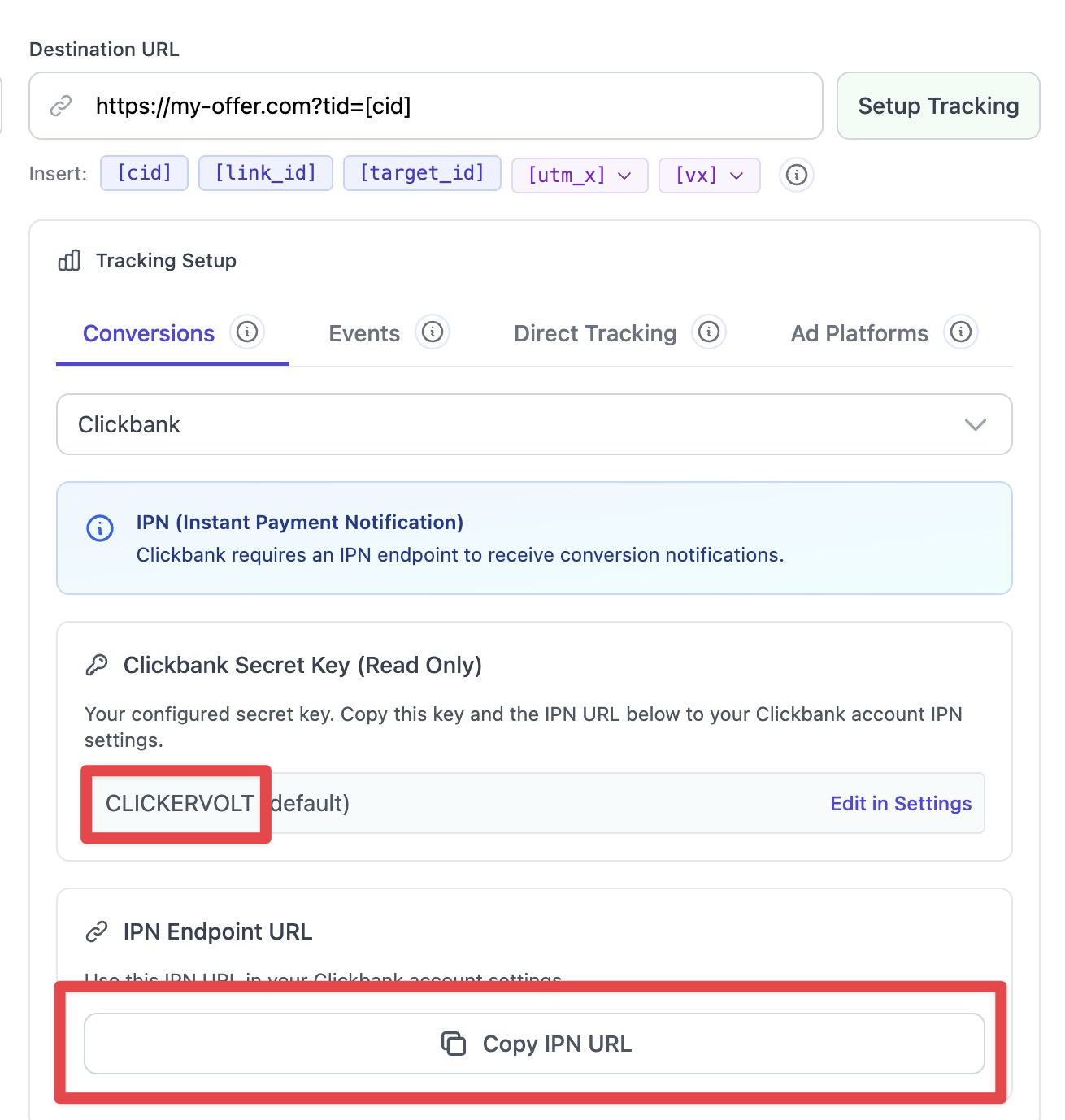
And paste in Clickbank here:
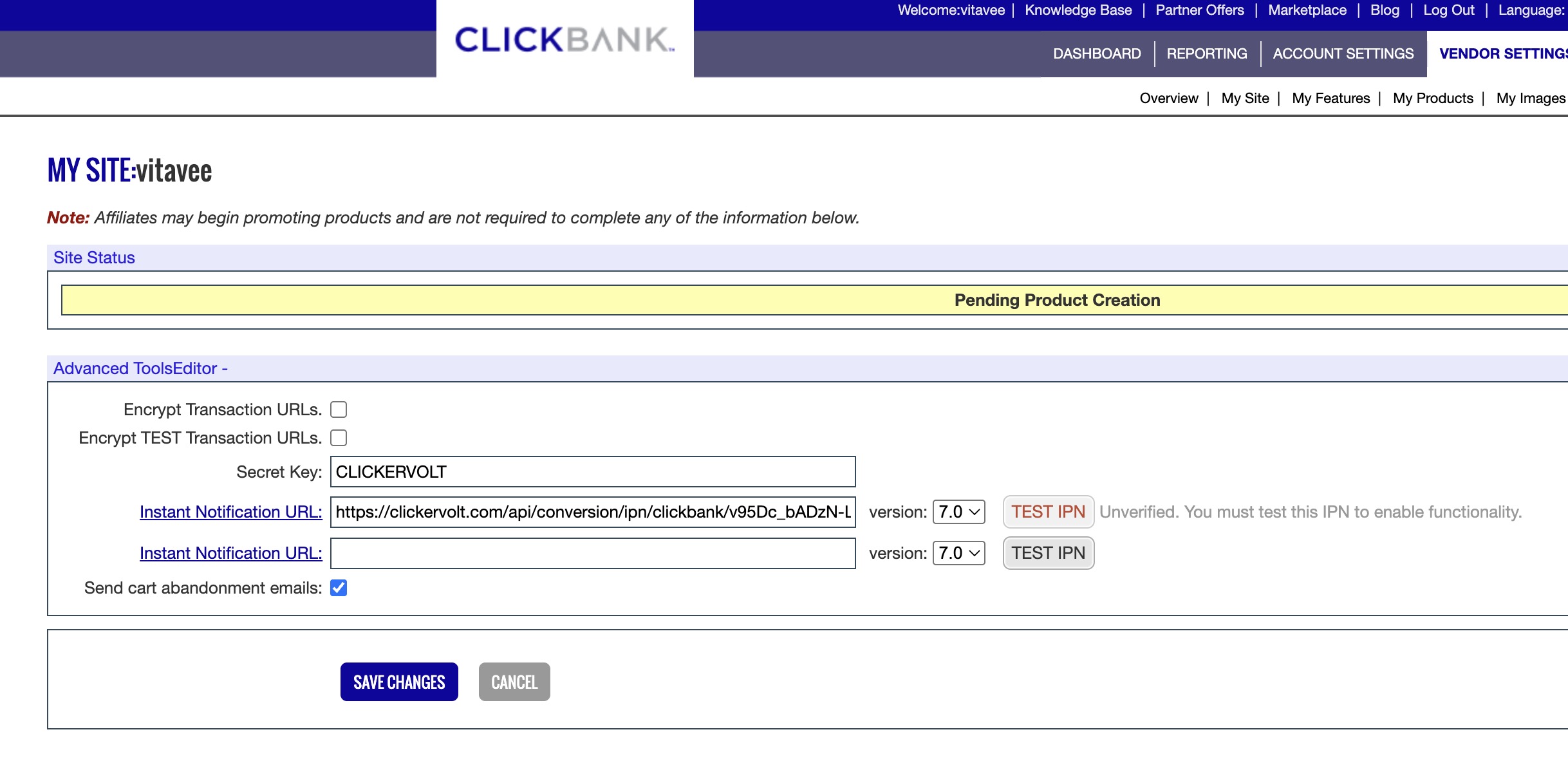
Then click "TEST IPN" and "SAVE CHANGES"
WarriorPlus
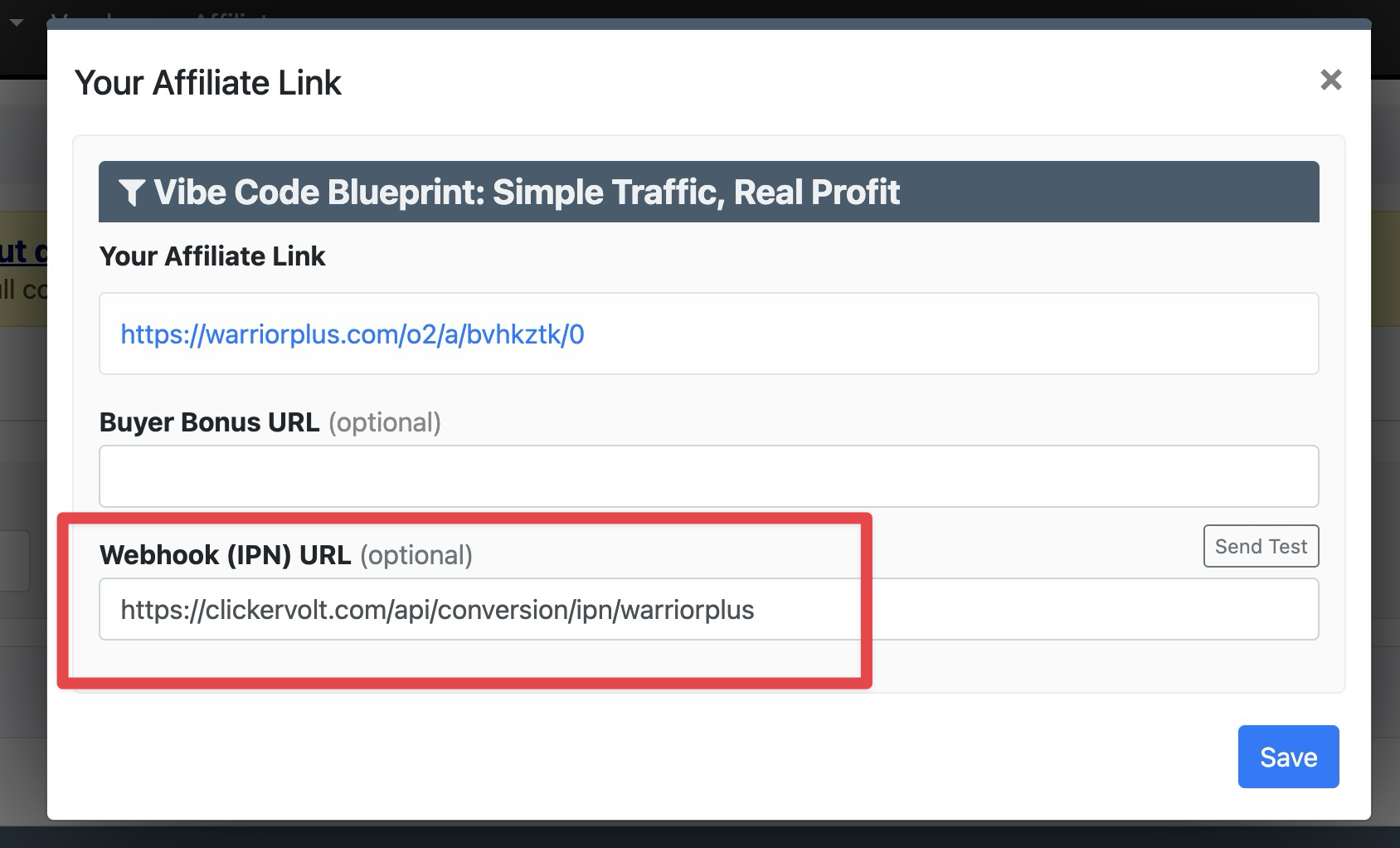
Must be configured for each offer. In the popup that shows your affiliate link, paste the ClickerVolt IPN here, then save:
Explodely
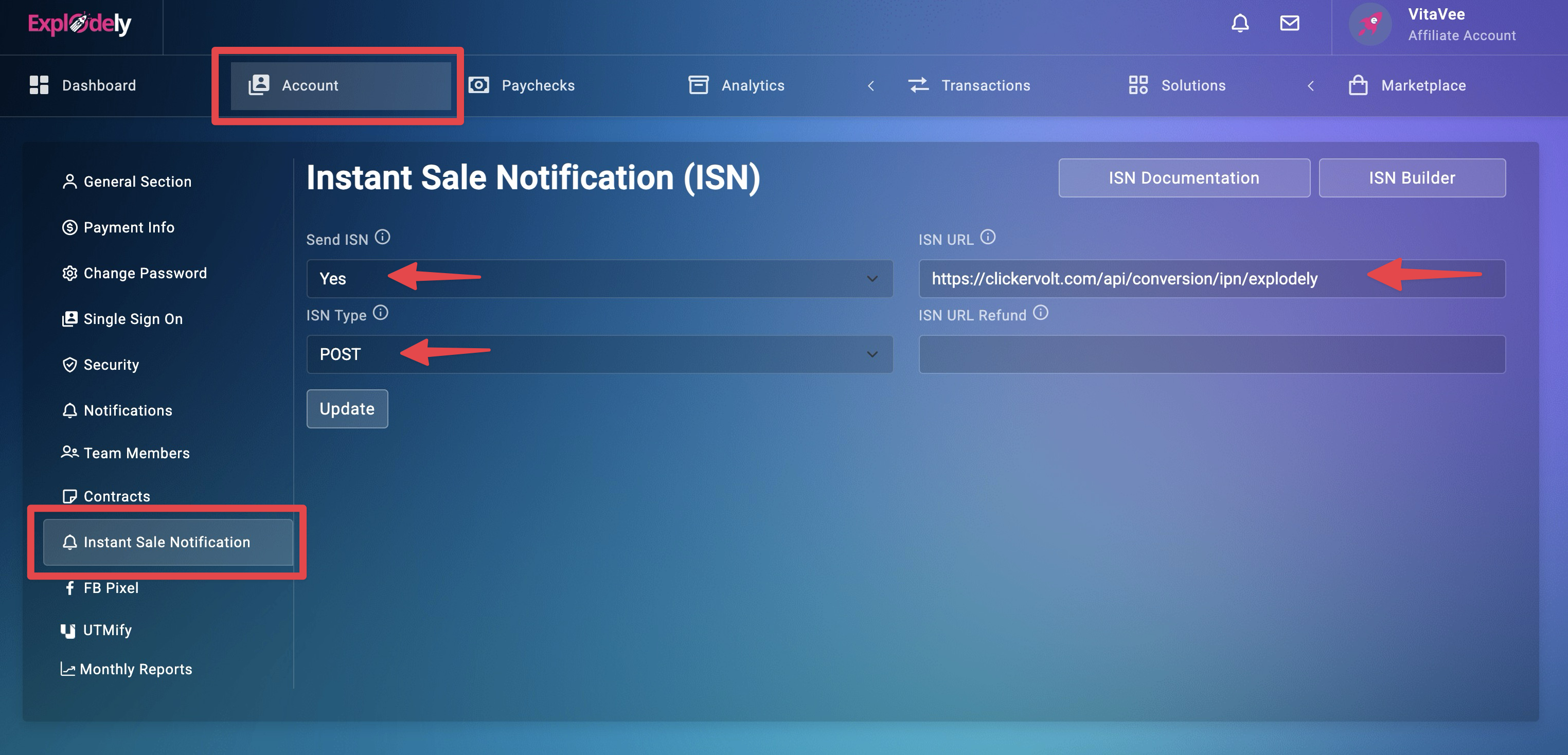
Configure under Account > Instant Sale Notification. Unlike WarriorPlus, this is a global setting and will be triggered for all offers.
Configure as shown below:
S2S Postback Networks:
MaxBounty
Add postback URL under Tools > Postback/Pixel. Use offer-specific postback or account-wide postback. MaxBounty uses tokens like #S1# for sub-IDs and #RATE# for commission.
Awin
Configure under Account > Tracking. Awin uses unique token format like !!!clickRef!!! and !!!commission!!!. Setup is account-wide for all advertisers.
Digistore24
Add postback URL under Settings > IPN/Postback. Digistore24 supports both IPN and postback modes - use postback mode for better compatibility.
All Other Networks:
Look for "Postback", "Pixel", "Server Postback", or "Conversion Tracking" sections in your network account. Each network uses different token formats - ClickerVolt automatically generates the correct format for each network.
Advantages and Limitations
Advantages:
- Most accurate conversion tracking (server-to-server, no browser dependency)
- No code installation required on thank-you pages
- Works even if you don't control the thank-you page (affiliate offers)
- Automatic commission and revenue tracking
- Transaction IDs for deduplication
- Tracks refunds and chargebacks (on supported networks)
- Supports 70+ affiliate networks
Limitations:
- Depends on network reliability - delayed or failed notifications mean missing conversions
- Only works for products/offers on supported networks
- Some networks have notification delays of several seconds to minutes
- Requires configuring each network separately (one-time setup per network)
Advanced Topics
Notification Delays and Reliability
Networks typically send notifications within seconds of a sale, but delays can occur during high-volume periods or network downtime. ClickerVolt processes notifications immediately when received, so any delay is from the network side. Most S2S postback networks are more reliable than IPN networks.
Refund and Chargeback Tracking
Some networks send refund notifications via IPN or postback. When supported, ClickerVolt automatically updates conversion data and adjusts your revenue statistics. This is more common with IPN networks (ClickBank, JVZoo) than S2S postback networks.
Commission Tiers and Upsells
Networks send separate notifications for frontend sales, upsells, and downsells. ClickerVolt tracks each conversion separately with its own revenue amount and transaction ID. Your statistics show total revenue per click across all funnel steps.
Transaction ID Deduplication
Networks include transaction IDs in their notifications to prevent duplicate tracking. If a network sends multiple notifications for the same transaction (e.g., retry logic), ClickerVolt automatically deduplicates based on the transaction ID.